




 Chat Now
Interactive LED multimedia display signage represents a cutting-edge fusion of LED visual technology and user engagement capabilities, designed to transform passive viewing into active interaction. Unlike traditional static or non-interactive LED displays, this signage enables users to connect with content through touch, gesture, voice, or mobile device integration—creating dynamic, personalized experiences that drive engagement, information retention, and brand connection. Its core purpose extends beyond content delivery: it serves as a two-way communication tool, empowering users to explore information, customize experiences, or participate in activities tailored to their needs.
Key defining features include multi-touch support (often 10+ touch points for simultaneous user interaction), high responsiveness (latency under 50ms to ensure smooth engagement), and compatibility with diverse multimedia formats—videos, animations, 3D models, and real-time data feeds. These displays range in size from compact 32-inch indoor kiosks (e.g., retail product finders) to large 100+ inch outdoor interactive walls (e.g., city center information hubs). The global demand for this technology has surged in recent years, driven by the rise of experiential marketing, smart retail, and digital public spaces—where audiences increasingly expect personalized, hands-on interactions over one-way content.
Widely adopted across retail, education, healthcare, and public sectors, interactive LED signage redefines user experiences: a museum visitor might swipe to explore historical artifacts in 3D, a retail shopper could tap to customize product options, or a student might gesture to manipulate educational simulations. By merging high-quality LED visuals with intuitive interaction, this signage bridges the gap between digital content and physical spaces, making it a cornerstone of modern user-centric communication strategies.
The design and construction of interactive LED multimedia display signage prioritize three core pillars: user-centric interaction, durability for high-traffic use, and seamless integration of hardware/software—all tailored to deliver reliable, intuitive experiences across environments. At the heart of the system is the LED display panel, engineered with high pixel density (1080p to 4K+ resolution) to ensure sharp, detailed visuals—critical for interactive content like text, 3D models, or small interface elements. Unlike standard LED panels, interactive variants feature a protective front layer (tempered glass with anti-glare and anti-fingerprint coatings) to withstand frequent touch or gesture interaction, while maintaining optical clarity.
A defining component is the interaction sensor system, which varies by use case:
Touch sensors: Capacitive touch technology (most common) uses a grid of electrodes beneath the display to detect finger contact, supporting multi-touch (10–40 points) for gestures like pinch-to-zoom or swipe. For outdoor or rugged environments, infrared (IR) touch systems are used—relying on IR beams to detect object interruptions, as they resist water, dust, and extreme temperatures.
Gesture sensors: Cameras or depth-sensing modules (e.g., LiDAR) are integrated above or beside the display to track hand movements (e.g., waving, pointing) without physical contact—ideal for hygiene-focused spaces (hospitals) or large displays (event stages).
Mobile integration: Bluetooth or Wi-Fi modules enable users to connect smartphones to the display, controlling content via apps or QR codes—expanding interaction beyond the display itself.
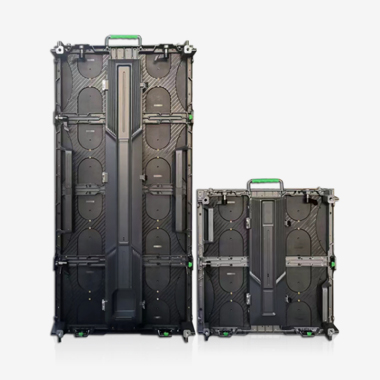
Durability is a key construction focus: indoor signage uses slim, lightweight aluminum frames (for easy wall mounting or floor-standing kiosks), while outdoor models feature IP65/IP67 waterproof ratings, corrosion-resistant materials, and temperature control systems (to operate in -30°C to 60°C). The control unit—a compact, high-performance computer (often embedded within the display)—runs specialized interactive software (e.g., TouchDesigner, Intuiface) and processes user input in real time. Wiring is minimized via internal cable management, and power supplies include surge protection to prevent damage from electrical fluctuations.
To ensure accessibility, designs often include adjustable height (for kiosks) or compatibility with assistive technologies (e.g., screen readers for visually impaired users). Calibration tools are integrated to align the sensor system with the LED display—critical for accurate touch/gesture detection, with on-board software allowing technicians to recalibrate quickly if alignment shifts. Overall, the design balances functionality, durability, and user-friendliness, ensuring the signage thrives in high-traffic, diverse environments.
Interactive LED multimedia display signage operates through a synchronized workflow of user input detection, real-time data processing, and dynamic content rendering—all working to create seamless, responsive interactions. At its core, the system integrates three key components: the LED display (for visual output), the interaction sensor (for user input), and the control unit (for processing and synchronization).
The process begins with user input detection:
For touch interaction: Capacitive sensors detect changes in electrical current when a finger touches the display surface, sending coordinate data (e.g., X/Y positions of the touch) to the control unit. IR touch systems work by emitting a grid of IR beams; when a finger blocks a beam, the sensor identifies the interrupted path and transmits the corresponding coordinates.
For gesture interaction: Depth-sensing cameras or LiDAR modules capture 3D data of the user’s movements, converting them into digital signals (e.g., "wave left" or "point to top-right corner"). AI algorithms process this data to recognize predefined gestures, ensuring accurate interpretation even in varying lighting.
For mobile interaction: When a user connects a smartphone via Bluetooth/Wi-Fi, the control unit receives commands (e.g., "play video" or "select option") from the mobile app, translating them into display actions.
Next, real-time processing occurs in the control unit. Specialized interactive software (e.g., custom apps or platform-based tools) receives input data, interprets the user’s intent (e.g., "swipe to next page" or "tap to open product details"), and triggers the corresponding content response. This processing happens in under 50ms to avoid lag—critical for maintaining intuitive interaction. For complex content (e.g., 3D model manipulation), the software uses GPU acceleration to ensure smooth rendering, while integrating with external data sources (e.g., product databases, live social media feeds) to update content in real time.
Finally, dynamic content rendering takes place on the LED display. The control unit sends updated content signals to the LED panel’s driver ICs, which adjust individual RGB diodes to display the new content—whether it’s a new page, a zoomed-in image, or an animated response to a gesture. The LED panel’s high refresh rate (60–120Hz) ensures the content updates smoothly, matching the speed of user interaction.
Redundancy systems are often integrated to prevent downtime: backup sensors or control units automatically activate if a component fails, while error-handling software provides user feedback (e.g., "please try again") if input is unrecognized. Together, these principles create a closed-loop system where user actions directly shape content, delivering the interactive, personalized experience that defines this signage.
Interactive LED multimedia display signage offers transformative advantages for user engagement and communication, but it also presents unique challenges that must be addressed to maximize its effectiveness.
Key Advantages:
Enhanced User Engagement and Retention: Unlike passive displays, interactive signage encourages active participation—users are 2–3 times more likely to remember content they interact with (e.g., a student manipulating a science simulation or a shopper customizing a product). This engagement deepens emotional connection: a museum’s interactive exhibit might spark curiosity about history, while a retail brand’s touchscreen could build loyalty by letting users personalize their experience.
Personalized and Adaptive Experiences: The signage adapts to user behavior: a healthcare kiosk might ask patients to input symptoms and display tailored health advice, or a hotel lobby display could let guests select language preferences and local attractions. This personalization makes content more relevant, increasing user satisfaction and reducing information overload.
Data-Driven Insights: Interactive systems collect user interaction data (e.g., touch frequency, time spent on content, popular features) which organizations use to optimize content and strategies. A retailer might discover that 70% of users tap on "sustainable products," prompting them to highlight these items more prominently; a museum could track which exhibits get the most interaction to refine future displays.
Versatility Across Environments: Designed for indoor/outdoor use, the signage adapts to diverse needs: waterproof outdoor models work for city centers or theme parks, while anti-microbial touchscreens suit hospitals. Its modular design allows customization—from small kiosks to large walls—making it suitable for retail, education, healthcare, and public sectors.
Notable Challenges:
Higher Cost and Complexity: The upfront cost of interactive LED signage is 2–3 times higher than non-interactive models, due to sensors, specialized software, and high-performance control units. A 55-inch interactive kiosk can cost
5,000–10,000, while a large outdoor interactive wall may exceed $50,000. Maintenance is also more complex: sensors require regular calibration, and software needs updates to fix bugs or add features—adding long-term costs.
User Adoption and Accessibility Barriers: Not all users are comfortable with interactive technology—older adults or tech-averse individuals may struggle with touch/gesture controls. Poorly designed interfaces (e.g., small buttons, confusing gestures) can further hinder adoption. Accessibility issues (e.g., lack of screen readers for visually impaired users or non-intuitive controls for those with motor disabilities) may exclude key user groups.
Technical Reliability Risks: High-traffic use increases wear and tear: touch sensors can become unresponsive due to dirt or damage, and outdoor systems may fail in extreme weather (e.g., heavy rain shorting sensors). Software glitches—such as lag or unrecognized gestures—can frustrate users, while network outages (for cloud-connected content) render dynamic features useless.
Content Creation Burden: Interactive content requires more time and expertise to develop than static content. A team might spend weeks designing a 3D interactive product catalog or educational simulation, compared to hours for a static image. Keeping content fresh (e.g., updating product options or educational modules) also demands ongoing resources, which small organizations may struggle to provide.
Interactive LED multimedia display signage’s versatility has driven adoption across diverse industries, while emerging technologies promise to expand its capabilities and redefine user interactions.
Key Applications:
Retail and E-Commerce: Retailers use interactive signage to enhance the in-store experience: touchscreen kiosks let shoppers search for products, check inventory, or customize items (e.g., a shoe store allowing size/color selection). Large interactive walls in malls display brand campaigns with gesture controls—users might wave to "flip" through product images or tap to send details to their phones. Some stores integrate AR (augmented reality) via the signage, letting customers "try on" clothes or visualize furniture in their homes.
Education and Museums: In education, interactive displays transform classrooms—teachers use multi-touch screens for collaborative lessons (e.g., students solving math problems together), while universities deploy large walls for science simulations (e.g., manipulating DNA models). Museums and galleries use the signage to bring exhibits to life: visitors swipe to explore historical timelines, tap to listen to audio guides, or gesture to rotate 3D artifacts (e.g., ancient pottery).
Healthcare and Public Services: Hospitals use interactive kiosks for patient check-in, symptom assessment, or wayfinding (e.g., directing visitors to departments). Public spaces (airports, train stations) deploy touchscreen information hubs—users tap to check flight/train times, find restaurants, or access local maps. Some cities use outdoor interactive walls for community engagement, letting residents submit feedback on urban projects or view live public transit data.
Corporate and Hospitality: Corporate lobbies use interactive displays for branding—visitors tap to learn about company history or view employee spotlights. Conference rooms feature multi-touch walls for collaborative presentations, where teams swipe to share data or annotate slides. Hotels use signage in lobbies: guests tap to book spa appointments, request room service, or explore local attractions, while digital concierges provide personalized recommendations.
Future Trends:
AI-Powered Intelligent Interaction: AI will enable more natural, context-aware interactions—signage will recognize user emotions (via facial recognition) to adjust content (e.g., calming visuals for stressed hospital patients) or predict needs (e.g., a retail kiosk suggesting products based on past interactions). Voice control will become more advanced, supporting natural language queries (e.g., "Show me nearby vegan restaurants") instead of predefined commands.
Multi-User and Collaborative Features: Future signage will support simultaneous collaboration across devices—multiple users could interact with the same display (e.g., a classroom wall where students work on group projects) while connecting their smartphones to contribute. Cloud integration will let users save interactions (e.g., a museum visitor saving a 3D artifact view to their phone) and continue engaging later.
Haptic Feedback and Sensory Integration: To enhance immersion, signage will add haptic feedback—users feel a "click" when touching the display or a vibration when manipulating 3D content. Some models may integrate other senses (e.g., subtle scents for retail displays or directional audio) to create multi-sensory experiences.
Sustainability and Energy Efficiency: Manufacturers will prioritize eco-friendly designs—using recyclable materials for frames, energy-efficient LED chips (reducing power use by 30%), and solar panels for outdoor models. Software will include "power-saving modes" that dim the display when not in use, further cutting energy consumption without compromising functionality.
Conclusion
Interactive LED multimedia display signage has redefined the relationship between users and digital content, transforming passive viewing into active, personalized engagement across industries. Its core strength lies in its ability to bridge digital innovation with user-centric design—whether empowering a student to explore science, a shopper to customize products, or a patient to access healthcare information. By merging high-quality LED visuals with intuitive interaction, this signage has become a critical tool for organizations seeking to connect with audiences in an increasingly digital, experience-driven world.
While challenges like cost, accessibility, and technical reliability persist, they are being addressed by advancing technology: more affordable sensors, AI-driven accessibility tools, and robust redundancy systems are making interactive signage more accessible and reliable. The future of this technology is rooted in deeper intelligence and immersion—AI will enable more natural interactions, haptic feedback will enhance sensory engagement, and multi-device collaboration will expand how users connect with content.
In essence, interactive LED multimedia display signage is more than a communication tool; it’s a catalyst for meaningful user experiences. It empowers users to take control of content, helps organizations deliver personalized value, and creates moments of connection that static displays never could. As it continues to evolve, this signage will remain at the forefront of user-centric innovation, shaping how we learn, shop, heal, and engage with the world around us—one interactive moment at a time.


Copyright © 2026 Shenzhen Cogo Technology Co.,Ltd.
All Rights Reserved

 Previous article