Author: sznbone Release date: May 08, 2026
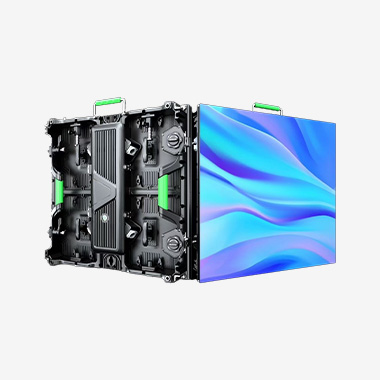
Conferences are a vital platform for businesses, organizations, and industry professionals to share knowledge, network, and showcase innovations. In today’s digital era, the quality of visual presentations can make or break a conference’s success—clear, engaging visuals help to capture attendees’ attention, convey information effectively, and leave a lasting impression. Among the various LED rental screens available, the P3.91 LED indoor rental screen has emerged as the gold standard for conferences, offering the perfect balance of image clarity, viewing distance, flexibility, and cost-effectiveness. Designed specifically for indoor conference settings, the P3.91 LED screen delivers exceptional visual performance, making it ideal for keynote speeches, product launches, panel discussions, and live streams.
To understand why the P3.91 LED indoor rental screen is the preferred choice for conferences, it’s important to first understand what the “P3.91” designation means. The “P” stands for pixel pitch, which is the distance between the centers of two adjacent pixels, measured in millimeters. A P3.91 screen has a pixel pitch of 3.91 millimeters, meaning that the distance between each pixel is 3.91 mm. This pixel pitch is specifically optimized for indoor conference venues, as it offers an ideal balance between image clarity and viewing distance. The P3.91 screen provides crisp, high-definition visuals for viewing distances ranging from 4 to 15 meters, which is the typical range for most conference halls and meeting rooms. This means that attendees seated in the front row will enjoy sharp, detailed visuals without seeing individual pixels, while those in the back row will still be able to clearly read text, view charts, and follow presentations.
One of the key advantages of the P3.91 LED indoor rental screen for conferences is its exceptional image clarity and detail. Conferences often involve the display of complex content, such as detailed charts, graphs, spreadsheets, and text-heavy presentations. The P3.91 screen’s pixel density—approximately 65,536 pixels per square meter—ensures that even the smallest text and finest details are clearly visible, eliminating the need for attendees to strain their eyes or squint to read content. This is particularly important for technical conferences, where precise data and detailed visuals are critical to conveying information effectively. Additionally, the P3.91 screen features a high refresh rate (≥3840 Hz) and low latency, ensuring that visuals are smooth and flicker-free, even when displaying fast-moving content or live streams. This is essential for conference presentations, as flicker or lag can distract attendees and undermine the professionalism of the event.
Color accuracy is another critical factor for conference LED screens, as many presentations rely on brand colors, charts, and images that must be displayed correctly. The P3.91 LED indoor rental screen uses high-quality SMD (Surface Mount Device) LED chips, which deliver vibrant, true-to-life colors with a wide color gamut (covering up to 110% sRGB) and delta E (color accuracy) values of less than 2. This means that brand colors are accurately represented, charts and graphs are clear and easy to interpret, and images are vivid and realistic. Whether it’s a corporate presentation showcasing a brand’s identity or a technical presentation displaying complex data visualizations, the P3.91 screen ensures that the content is displayed exactly as intended, enhancing the overall professionalism of the conference.
Flexibility and adaptability are also key benefits of the P3.91 LED indoor rental screen for conferences. Conferences come in all shapes and sizes, from small boardroom meetings to large-scale conventions with thousands of attendees. The P3.91 screen is modular, meaning that panels can be combined in various configurations to create screens of different sizes and shapes—from small 2x2 meter screens for boardrooms to large 10x6 meter video walls for convention centers. This flexibility allows conference organizers to adapt the screen to the venue’s layout and the event’s specific needs. For example, a small panel discussion might require a compact screen behind the panelists, while a keynote speech might use a large screen to ensure that all attendees can see the presentation. Additionally, the P3.91 screen can be easily reconfigured during the conference, allowing organizers to switch between presentations, live streams, and video montages without disrupting the flow of the event.
Ease of installation and operation is another important advantage of the P3.91 LED indoor rental screen for conferences. Conference organizers often have tight setup windows, and they need equipment that can be installed quickly and easily. The P3.91 screen features a lightweight, modular design with quick-lock mechanisms, allowing a team of 2 to 3 people to set up a standard size screen in under an hour. Additionally, the screen is compatible with standard conference equipment, such as laptops, projectors, video switchers, and sound systems, making it easy to integrate into the conference’s existing setup. Most P3.91 rental packages include a user-friendly control system, which allows conference staff to easily manage the screen’s content, adjust brightness, and switch between input sources—even without technical expertise. This simplicity ensures that the screen operates smoothly throughout the conference, with minimal downtime.
Reliability is also a critical factor for conference LED screens, as any technical failure can disrupt presentations and damage the conference’s reputation. The P3.91 LED indoor rental screen is built to be durable and reliable, with robust die-cast aluminum cabinets that protect the LED panels from damage during transport and setup. It features redundant power and signal systems, so if one power source or signal cable fails, the screen will continue to operate without interruption. Many models also have built-in diagnostic tools that allow technicians to quickly identify and resolve any issues, minimizing downtime. Additionally, the P3.91 screen has a long lifespan (up to 100,000 hours of operation at 50% brightness), ensuring that it can withstand the rigors of frequent rental and use in conference settings.
Cost-effectiveness is another key advantage of the P3.91 LED indoor rental screen for conferences. Renting a P3.91 screen eliminates the need for a large upfront investment in equipment, and organizers can choose the size and specifications that best fit their budget and conference needs. The P3.91 screen offers a balance of performance and cost, making it more affordable than finer pixel pitch screens (such as P2.5 or P1.9) while still delivering exceptional image clarity for conference settings. Additionally, rental companies provide full support, including delivery, setup, operation, and teardown, which reduces the stress on conference organizers and ensures that the screen is installed correctly and functions properly. For conferences with tight budgets, this can make a significant difference, allowing organizers to allocate resources to other critical areas, such as speaker fees, catering, or marketing.
To illustrate the impact of the P3.91 LED indoor rental screen on conferences, consider a recent case study of a technology conference held in a large convention center. The conference featured multiple keynote speeches, product launches, and technical workshops, and the organizers needed a screen that could deliver clear, detailed visuals for a large audience. They opted for a 8x5 meter P3.91 LED screen, which was installed in the main hall. The screen was used to display keynote presentations, live demos of new products, and real-time data visualizations, and its exceptional clarity and color accuracy ensured that attendees could easily follow along. The modular design allowed the screen to be reconfigured for different sessions, and the easy operation meant that conference staff could quickly switch between content sources. The conference was a resounding success, with attendees praising the high-quality visuals and the professionalism of the event.
Another example is a small corporate board meeting with 20 attendees. The organizers needed a compact screen that could display detailed financial reports and presentations. They chose a 3x2 meter P3.91 LED screen, which was installed in the boardroom. The screen’s crisp visuals allowed attendees to easily read the financial data and charts, and its compact size did not overpower the small space. The easy setup and operation meant that the meeting could start on time, and the screen’s reliability ensured that there were no technical glitches during the presentation.
When choosing a P3.91 LED indoor rental screen for a conference, there are several key factors to consider. First, the size of the screen—ensure that it is proportional to the venue and the number of attendees, with a viewing distance that fits the P3.91’s optimal range (4 to 15 meters). Second, the screen’s specifications—look for a high refresh rate (≥3840 Hz), wide color gamut, and low delta E values to ensure color accuracy and smooth visuals. Third, the installation and operation—choose a screen with quick-lock mechanisms and a user-friendly control system, and a rental company that offers professional setup and support. Finally, the cost—compare rental packages to find one that fits your budget, including delivery, setup, and teardown.
In conclusion, the P3.91 LED indoor rental screen is the ideal choice for conferences, offering exceptional image clarity, color accuracy, flexibility, and cost-effectiveness. It is specifically optimized for indoor conference settings, delivering crisp, detailed visuals that engage attendees and convey information effectively. Whether it’s a large-scale convention or a small board meeting, the P3.91 screen adapts to any venue and event need, enhancing the professionalism of the conference and leaving a lasting impression on attendees. For conference organizers looking to deliver a high-quality visual experience, the P3.91 LED indoor rental screen is the perfect solution.


Copyright © 2026 Shenzhen Cogo Technology Co.,Ltd.
All Rights Reserved

 Previous article